Claude Code integration
This page shows how to use cc-router’s built-in settings.json editor to wire Claude Code into the model-opus / model-sonnet / model-haiku virtual models you have aggregated — with a single click.
Compared with the “copy the env snippet and paste it into your config file by hand” approach in Getting Started, this is the native cc-router way: one button writes the cc-router fields into ~/.claude/settings.json for you. It is the most reliable path, does not depend on your shell environment, and any existing config of yours is preserved.
Prerequisites
- cc-router installed and configured with at least one virtual model bound (see Getting Started)
- Claude Code installed
- cc-router running, with the local proxy listening on
127.0.0.1:23456(check the Proxy listen address shown at the top of the Setup guide page)
Step 1: Open Setup guide → Claude Code
Open cc-router, switch to Setup guide in the left sidebar, and pick the Claude Code tab at the top.
The Proxy listen address at the top shows the current port and run status (e.g. 127.0.0.1:23456 · Running). The settings.json editor below reads and writes ~/.claude/settings.json directly; the In sync badge in the top-right means the editor matches the file on disk.
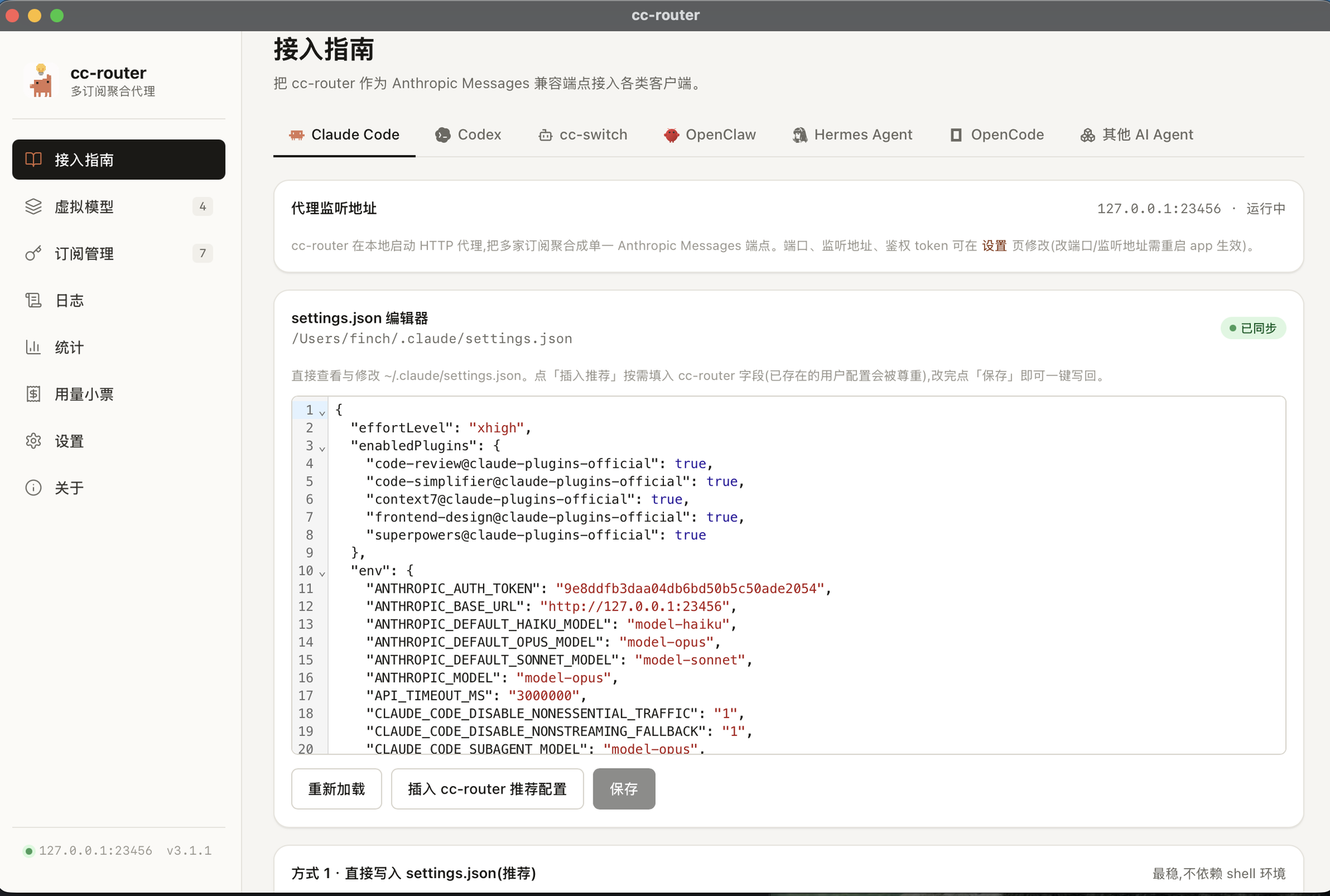
Step 2: Click “Insert cc-router recommended config”
Click the Insert cc-router recommended config button below the editor. cc-router fills in the fields it needs, on demand:
- If the file already contains your own config (e.g.
effortLevel,enabledPlugins), it is not overwritten — only the cc-router-relatedenvfields are added. - The token and port are filled in from the live running values, so there’s nothing to copy by hand.
The core env fields it inserts look like this (the exact values come from the app):
{
  "env": {
    "ANTHROPIC_BASE_URL": "http://127.0.0.1:23456",
    "ANTHROPIC_AUTH_TOKEN": "the real token filled in by the app",
    "ANTHROPIC_MODEL": "model-opus",
    "ANTHROPIC_DEFAULT_OPUS_MODEL": "model-opus",
    "ANTHROPIC_DEFAULT_SONNET_MODEL": "model-sonnet",
    "ANTHROPIC_DEFAULT_HAIKU_MODEL": "model-haiku",
    "CLAUDE_CODE_SUBAGENT_MODEL": "model-opus",
    "API_TIMEOUT_MS": "3000000",
    "CLAUDE_CODE_DISABLE_NONESSENTIAL_TRAFFIC": "1",
    "CLAUDE_CODE_DISABLE_NONSTREAMING_FALLBACK": "1"
  }
}model-opus, model-sonnet and model-haiku are the virtual slot names you bound inside cc-router; the app translates them into the real model names automatically.
1M context syntax: if the real model bound to a slot supports a 1M context window, you can write the model name as
model-opus[1m]— this is syntax Claude Code understands.
Step 3: Save and restart Claude Code
Click Save and cc-router writes the changes back to ~/.claude/settings.json in one shot (the badge returns to In sync). To inspect the latest content on disk, click Reload.
Fully quit and restart Claude Code for the new config to take effect. From then on every request Claude Code makes is routed through 127.0.0.1:23456 to your bound real models.
Verify
In the cc-router main window, go to Request logs in the left sidebar, start a Claude Code conversation, and you should see the request recorded — the Client column shows Claude Code, and the Virtual model / Real model columns show the slot and the final upstream model.
Troubleshooting
- Changes don’t take effect —
settings.jsonis not hot-reloaded; you must fully quit and restart Claude Code. - Port in use /
connection refused— if the default port23456is taken, cc-router auto-increments by 1. Trust the actual port shown in Proxy listen address at the top of the Setup guide, and click Insert cc-router recommended config again to sync the latest port. 401 Unauthorized— the cc-router token may have rotated. Return to this page, click Insert cc-router recommended config again, then Save to write the latest token.- Prefer manual config — if you’d rather edit the file yourself, follow the env snippet in Getting Started; the result is the same.
Security notes
ANTHROPIC_AUTH_TOKENis an access credential — equivalent to calling all your upstream providers directly. Do not leak it or commit it to a repository.- Only expose the cc-router port on a trusted LAN; assess the risk yourself before exposing it publicly, and harden it with a reverse proxy plus an auth layer.